
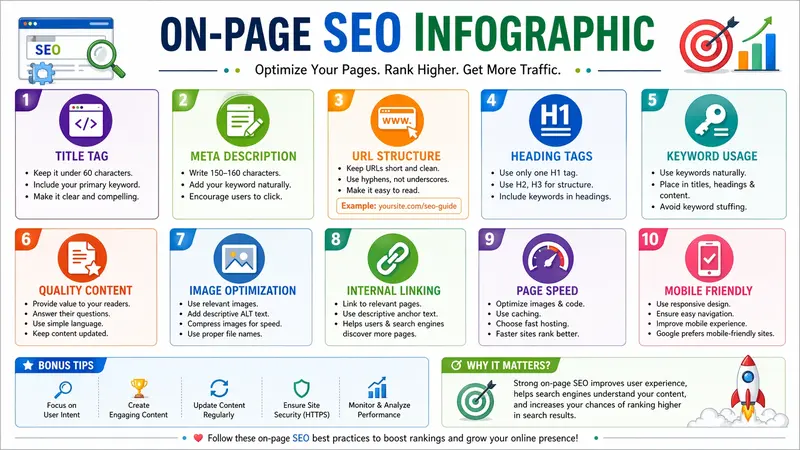
Search engine optimization is important for anyone who wants to grow online. Many people feel confused when they hear technical SEO terms. That is why visual learning helps a lot. An on-page seo infographic can explain complex ideas in a simple and clear way.
In this guide, you will learn the basics of on-page SEO, why it matters, and how you can improve your website step by step. The goal is to help you understand everything in an easy way so you can apply it without stress.
What is On-Page SEO?
On-page SEO means optimizing the content and structure of your website pages. You control everything in on-page SEO, which makes it powerful and effective.
It focuses on improving:
- Content quality
- HTML elements
- User experience
When you optimize your pages properly, search engines understand your content better. This helps your website rank higher in search results.
Why Visual Learning is Important
Many people learn faster when they see information instead of just reading text. That is where an on-page seo infographic becomes useful. It breaks down important SEO elements into simple visuals.
This method helps you:
- Understand faster
- Remember key points
- Apply strategies easily
- Share knowledge with others
Infographics also make your content more attractive and engaging.
Key Elements of On-Page SEO
Let’s look at the most important elements you need to focus on.
1. Title Tag
The title tag is the first thing users see in search results. It should be clear and interesting.
Best practices:
- Keep it short (under 60 characters)
- Add your main keyword
- Make it attractive for clicks
2. Meta Description
A meta description gives a summary of your page.
Tips:
- Write 150–160 characters
- Use simple language
- Encourage users to click
3. URL Structure
A clean URL improves both user experience and SEO.
Good example:
- yoursite.com/seo-guide
Avoid long and confusing URLs with numbers or symbols.
4. Headings (H1, H2, H3)
Headings help organize your content. They also make your article easier to read.
Guidelines:
- Use only one H1
- Use H2 and H3 for sections
- Keep headings clear and simple
5. Keyword Usage
Keywords help search engines understand your topic.
Use keywords:
- Naturally, in the content
- In headings when needed
- Without overstuffing
Always focus on readability first.
6. Content Quality
Good content is the heart of SEO.
Make sure your content:
- Solves a problem
- Answers user questions
- Uses simple English
- Stays clear and direct
Write in an active voice to keep readers engaged.
7. Image Optimization
Images make your content more interesting, but you must optimize them.
Checklist:
- Use proper file names
- Add ALT text
- Compress images to reduce size
This improves page speed and accessibility.
8. Internal Linking
Internal links connect your pages.
Benefits:
- Help users navigate
- Improve SEO structure
- Increase time on site
Link to relevant pages naturally within your content.
9. Page Speed
A slow website drives users away.
Improve speed by:
- Compressing images
- Using fast hosting
- Reducing unnecessary code
Fast pages rank better and keep users happy.
10. Mobile Optimization
Most users visit websites on mobile devices.
Make sure your site:
- Looks good on all screens
- Loads quickly on mobile
- Has easy navigation
A mobile-friendly site improves both ranking and user experience.
How to Create a Simple SEO Infographic
You can create your own visual guide using easy tools.
Follow these steps:
- List all important SEO elements
- Keep text short and clear
- Use icons and simple visuals
- Choose clean colors
- Organize content in sections
Tools you can try:
- Canva
- Piktochart
- Adobe Express
A well-designed on-page seo infographic can attract more users and increase shares.
Benefits of Using Infographics
Infographics offer many advantages for SEO and content marketing.
They help you:
- Increase user engagement
- Improve content sharing
- Gain backlinks
- Simplify complex topics
- Build brand authority
People prefer visual content because it saves time and effort.
Common Mistakes to Avoid
Many beginners make simple mistakes that hurt their SEO.
Avoid these:
- Writing long and confusing paragraphs
- Using too many keywords
- Ignoring mobile users
- Uploading large images
- Forgetting internal links
Focus on clarity and user experience at all times.
Conclusion
On-page SEO does not have to be difficult. When you break it down into simple steps, you can improve your website easily. Focus on quality content, proper structure, and user experience.
Visual tools like infographics make learning faster and more effective. They help you understand what to do and how to do it.
Start applying these tips today, and you will see better results in your website performance over time.